
Sales management system: every sale recorded, every shilling explained
See who sold what, to whom, for how much and what you earned. NewHope POS turns daily selling into clear sales, profit and cash figures you can trust.
Start free trial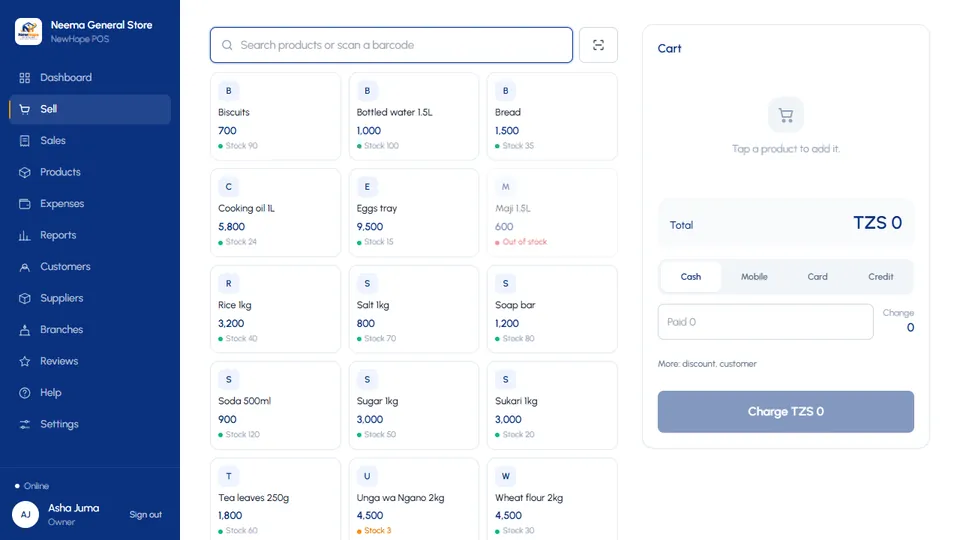
Sell quickly at the till
Search or tap a product, apply a discount within your rule, take cash, mobile money or card and print the receipt. Credit sales go straight to the customer's debt record.
- Touch-friendly till for phones and tablets
- Random receipt numbers that cannot be guessed
- Customers attached to sales for history and loyalty
Credit and debts under control
Register customers who buy on credit, set due dates, take part payments and print a statement. Credit counts as a sale on the day of sale and payments count as cash on the day received.
- Debt balance and overdue list
- Ready-made WhatsApp and SMS reminders you send from your phone
- Debtor records are protected from being edited or deleted
Reports that answer real questions
Which product earns most? Which day is best? Which cashier sells most? Export to CSV, and check totals by day or by payment method.
- Sales, profit and payment-method breakdown
- Advanced reports and analytics on higher packages
- Voided sales are shown and not counted
Frequently asked questions
Can I sell on credit?
Yes. Register the customer once, then record credit sales and later payments. Your package sets how many active debtors you can have.
Can I see sales per cashier?
Yes. The Owner and Director see every sale with the cashier who made it; Staff see their own.
Can I cancel a wrong sale?
An Owner or Director can void a sale. It stays visible in the audit trail and is not counted in totals.